Don't treat accompanying persons as mere "footnotes" anymore. Give your participants the option to register their guests via a dedicated, fully integrated sub-form. You can limit quotas, verify identities, and ensure smooth logistics, while treating each accompanying person as a full participant.


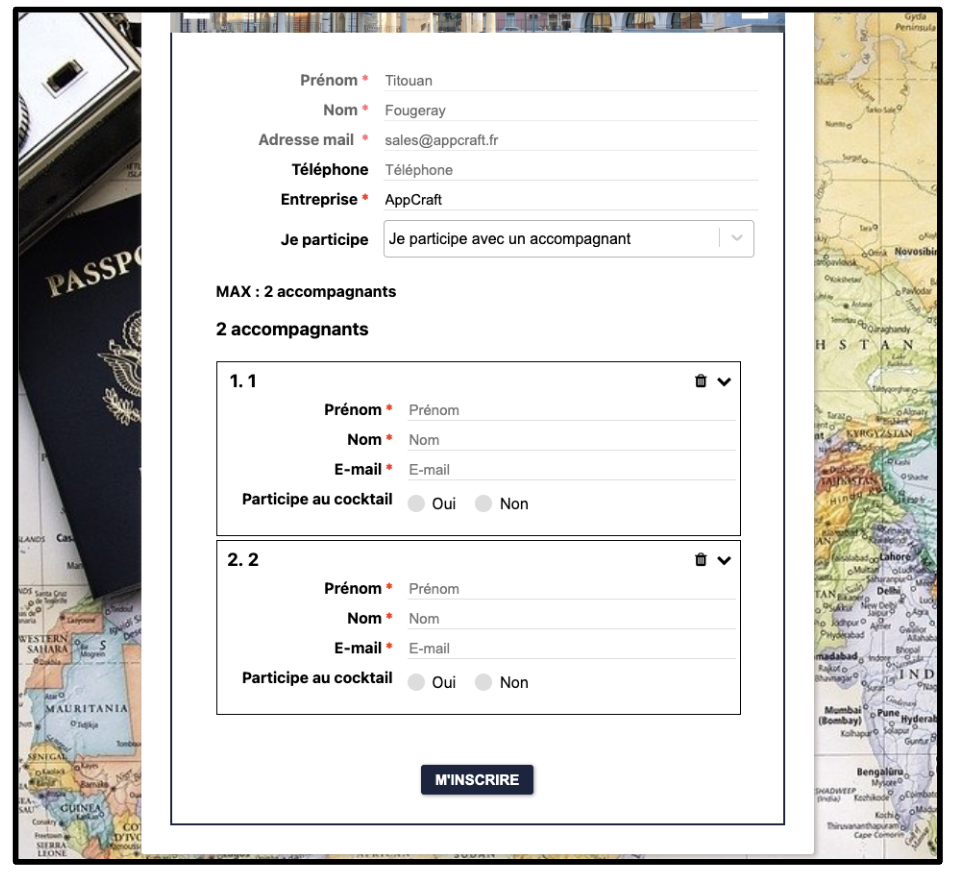
Registering a guest shouldn't be a chore. Our system allows you to configure "data inheritance": the accompanying person automatically receives the address, company, or type of participation of the main guest. The form is streamlined, requesting only the strictly necessary information (first name, last name, dietary requirements), which drastically reduces the abandonment rate during registration.
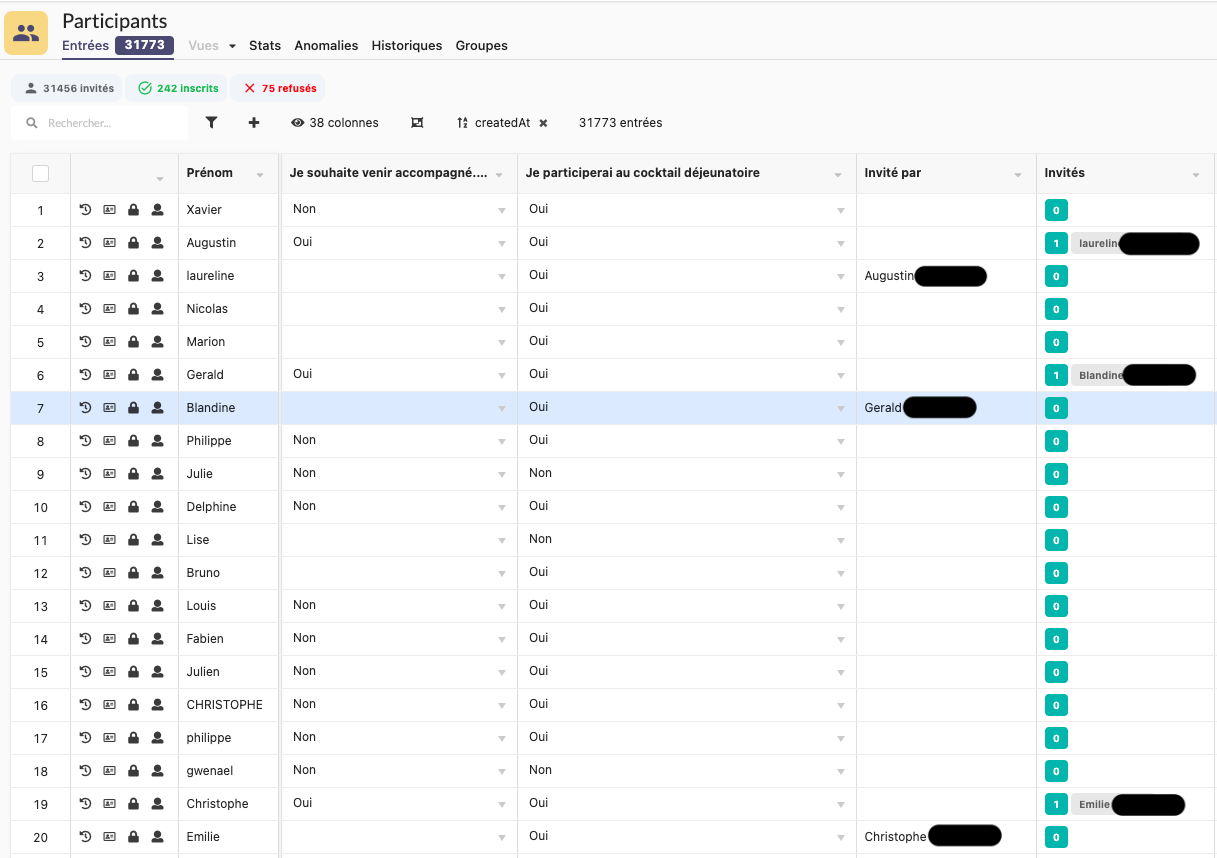
Unlike basic systems that store the accompanying person in a simple text note, AppCraft creates a real participant file for each registered person. This means that the accompanying person exists in your database: they can have their own badge, their own access rights, and be accurately counted in your catering or security reports security.
This approach guarantees you detailed, high-quality management of the specific needs of each participant, whether they are the main participant or an accompanying person.
To avoid confusion, the main host remains the primary point of contact. They receive by email their own access details and the badges (PDF/QR Code) for all their companions. On the day, a single scan is all it takes to validate the arrival of the entire group. This saves a huge amount of time at reception and provides security for participants who are managing the logistics for their partners.
Avoid overcrowding. Specify exactly how many guests are allowed per participant (0, 1, or unlimited) and according to ticket type (e.g., VIPs are allowed +2, standard tickets are allowed 0). For sensitive events, enable the moderation option: guests are pre-registered, but their access will only be effective after your manual validation from the back office.
A module for managing accompanying guests is particularly useful for conferences, residential seminars, corporate trips, and events that include spouses, colleagues, or partners.
It allows each companion to be linked to their primary guest while retaining their individual information: personal details, dietary preferences, activities, or lodging needs.
With AppCraft, each chaperone has their own participant profile. This allows organizers to plan for logistical needs and accurately count everyone in attendance—not just the main guests.
To simplify group registrations, it is best to allow the primary registrant to add their companions directly from their own registration form.
AppCraft offers a dedicated subform and a system for automatically retrieving certain data from the primary participant, such as their address, company, or type of participation.
The accompanying person need only provide their specific information, such as their identity and dietary preferences.
This approach eliminates the need for repetitive data entry and allows organizers to access information about each guest in a structured database.
To manage capacity, it is important to determine in advance the number of accompanying persons allowed for each category of participants.
AppCraft allows you to set different quotas based on the profile or ticket type. For example, a VIP guest may be allowed to bring two guests, while a standard attendee cannot bring any.
Organizers can also enable manual validation: in this case, accompanying guests are pre-registered, but their participation must be confirmed through the back office before their access becomes active.
To streamline the check-in process, the badges for accompanying guests must be linked to their primary guest while still allowing each person to be identified individually.
With AppCraft, the primary participant can receive their own access credentials, as well as PDF badges and QR codes for their companions. On the day of the event, a group scan allows the entire group to check in at once.
However, each accompanying person retains their own participant profile and access rights. This feature is particularly well-suited for events that welcome families or groups of employees who have registered together.
Managing accompanying persons requires gathering information about their individual needs at the time of registration, rather than relying solely on the information provided by the primary participant.
For example, two people who are registered together may have different diets or participate in different activities.
AppCraft allows you to customize forms to collect this information and link each accompanying person to an individual record. Organizers can then use this data to prepare their logistics lists.
It is still essential to verify the information gathered and confirm availability with the relevant service providers.