
ParticipantsArticle 5 of 12
Use the "More actions" menu for participants
The More actions menu, located at the top right of the participant list, contains specialized export options and batch processing features. Its content depends on the modules enabled for your event: it’s normal not to see all of the actions listed below.
Launch an action
Section titled “Launch an action”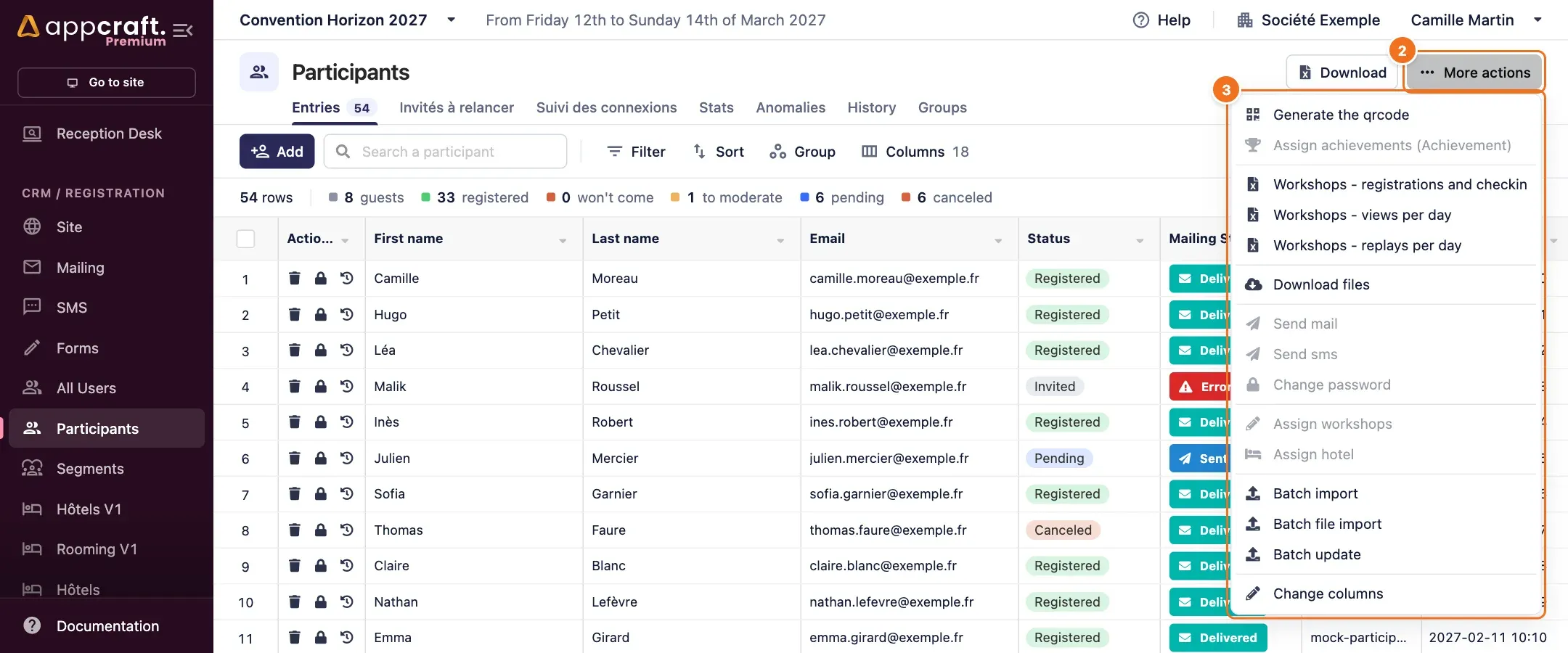
- If the action has a scope that applies to specific people, check the boxes next to them in the table. If no selection is made, most exports include all visible participants (including the filtered list).
- Click More actions.
- Choose the action. A grayed-out action requires a selection.
Exports and Downloads
Section titled “Exports and Downloads”| Action | What it does | Condition |
|---|---|---|
| Generate the qrcode | Download a ZIP file containing one QR code (PNG image) per participant. | — |
| Workshops - registrations and checkin | Exports workshops registrations and check-ins to Excel. | Program Module |
| Workshops - views per day | Exports to Excel, for a selected date, the participants who attended the live workshops. | Program Module |
| Workshops - replays per day | Exports to Excel, for a date chosen, the participants who watched the replays. | Program Module |
| Download files | Download the files uploaded to the “file,” “image,” or “video” columns. | A column of this type exists |
| Download badges | Download badges for the selected participants. | Badges and Selection Module |
Workshops, Appointments, and Logistics
Section titled “Workshops, Appointments, and Logistics”| Action | What it does | Condition |
|---|---|---|
| Assign workshops | Register the selected participants in one or more workshops. | Program and Selection Module |
| Delete session registrations | Removes all session registrations for the selected participants. | Program and Selection Module |
| Assign hotel | Assigns a hotel to the selected participants. | Logistics and Selection Module |
| Assign Badges (Achievements) | Assign a gamification achievement to the selected participants. | Gamification and Selection Module |
Mailings and Accounts
Section titled “Mailings and Accounts”- Send an email and Send a text message: see Send an email or text message to participants.
- Change password: Sets or generates the password for the selected participants.
- Send appointment recap and Send workshop recap: Send each selected participant a list of their appointments or workshops. These actions appear only if your project manager has configured the summaries.
Imports and Structure
Section titled “Imports and Structure”- Batch import, Batch file import, Batch update: see Importing and Updating Participants.
- Update columns: see Customize Participant Columns.
Frequently Asked Questions
Section titled “Frequently Asked Questions”I don’t see “Force Appointment Slots.” Is this normal?
Section titled “I don’t see “Force Appointment Slots.” Is this normal?”Yes. This action automatically assigns appointments to the selected participants. It is enabled only for certain events: contact your project manager if you need it.
Why does the workshop export include only some of the participants?
Section titled “Why does the workshop export include only some of the participants?”The export has a scope of the selection, or, if none is selected, the visible list. Remove your filters and the selection to export for everyone.
See also
Section titled “See also”Was this page helpful?
Thanks for your feedback!
Can’t find your answer? Contact support
© AppCraft EventsAppCraft Events websiteLog inContact support