
CommunicationArticle 12 of 13
Frequently Asked Questions About Email Campaigns
Short answers to the most frequently asked questions about emails sent from the Mailing module.
How do I test an email before sending it?
Section titled “How do I test an email before sending it?”- In Mailing, open the mailing template you want to test.
- Click Send a test email in the top right corner. Save your changes first: the button will be grayed out until you do so.
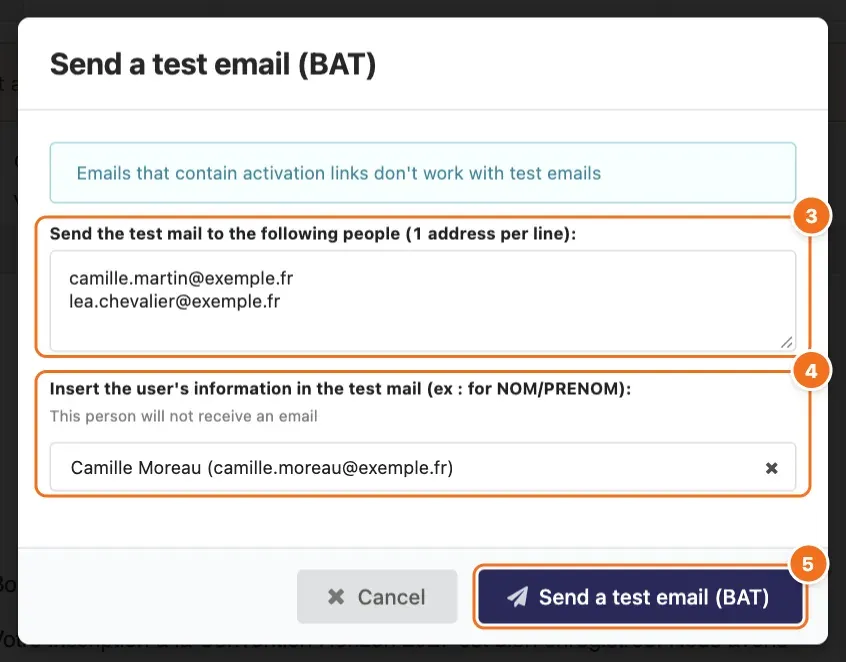
- In the Send a test email to the following people field, enter one or more email addresses, one per line.
- To view the email with real data (name, first name, etc.), choose a participant from the field next. This participant will not receive the email.
- Click Send a test email (BAT).
How do I send an email to a single participant?
Section titled “How do I send an email to a single participant?”- In the list of participants, check the box next to the person’s name. To test it out, create a test participant.
- Open the actions menu and click Send an email.
- Select the template, then click Send to 1 contact.
Where can I view the delivery statistics?
Section titled “Where can I view the delivery statistics?”- For an overview: the Dashboard tab in the Mailing module, where you can select a time period (Today, last 7 days, etc.).
- For a specific template: open it, then go to the Tracking & statistics tab.
- For undelivered emails: the Errors tab.
What is the maximum file size for an email with an attachment?
Section titled “What is the maximum file size for an email with an attachment?”The limit depends on the recipient’s email account. Keep the total size under 10 MB, including attachments, banners, and images: all email accounts can handle at least this size.
A button in the email leads to an error page
Section titled “A button in the email leads to an error page”Two possible causes:
- The button link is incorrect. Open the template and go to the Mail content tab. Hover over the button, click the gear icon, and check the link. Test it in your browser.
- The destination domain is incorrect. The button links to the website, platform, or form, but its domain name or subdomain is incorrect. Check the published address of the target page.
See also
Section titled “See also”Was this page helpful?
Thanks for your feedback!
Can’t find your answer? Contact support
© AppCraft EventsAppCraft Events websiteLog inContact support