
Settings and connectorsArticle 4 of 6
Release the event data
Once the event is over and its results have been analyzed, delete the personal data it collected: participant profiles, registrations, mailings, scans, and answers. The Data tab tallies this data module by module and deletes it, either in parts or all at once. Before deleting, you can freeze the Smart Hub dashboards and the carbon footprint report to preserve their figures.
Before you begin
Section titled “Before you begin”- Export everything you’ll need later: participant list, quiz and survey results, lead generation contacts, and carbon footprint files. Deletion is irreversible: neither AppCraft nor you will be able to recover the data.
- The Technical Settings menu is located in the Settings section. If you don’t see it, ask your project manager to enable it.
View event data
Section titled “View event data”- In the menu, under Settings, click Technical Settings, then click the Data tab.
- Each row corresponds to a data type, along with the number of items in that category.
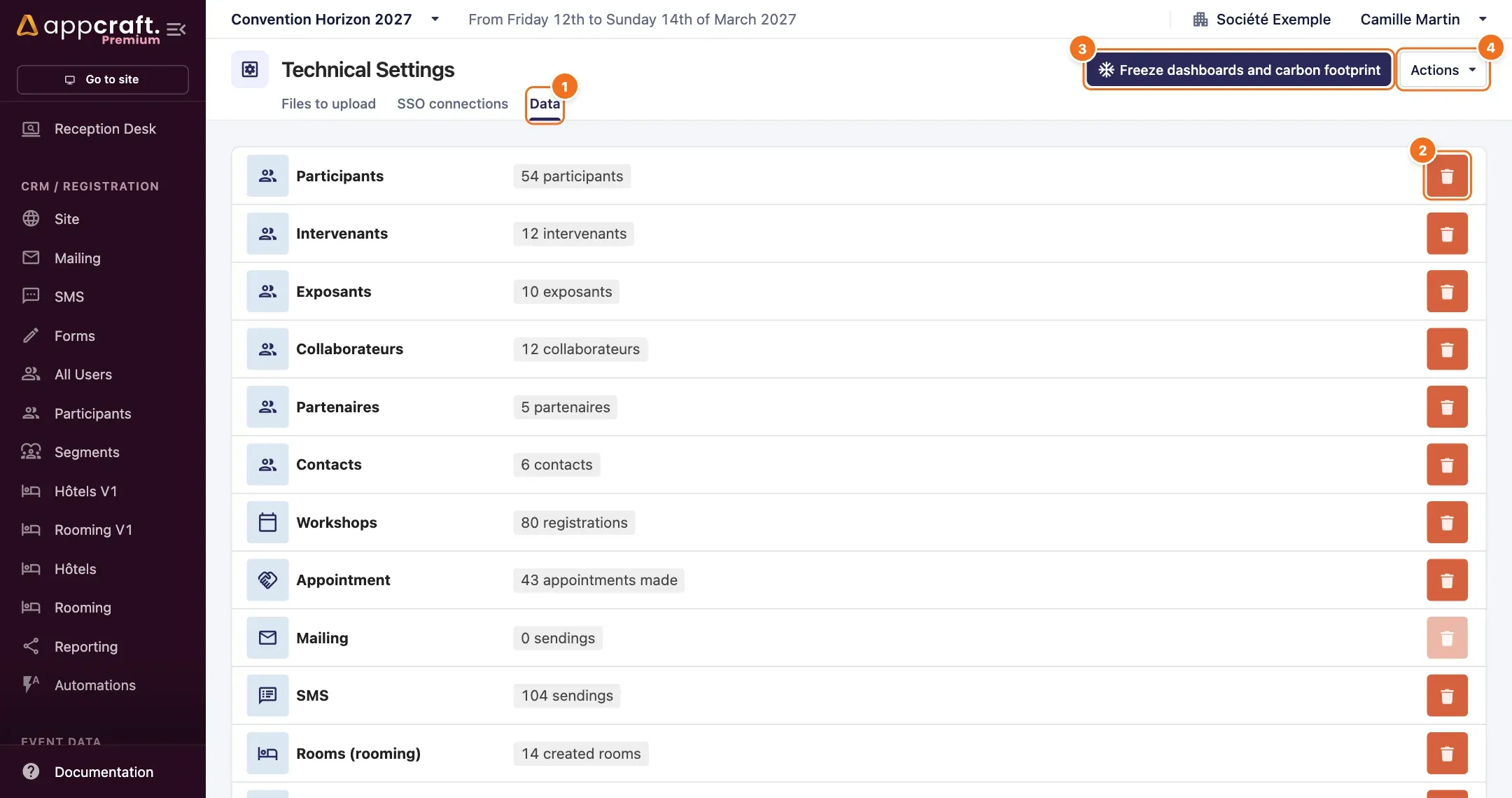
The rows shown depend on the modules enabled for the event:
| Rows | What it counts |
|---|---|
| One row per category (Participants, Speakers, Exhibitors, etc.) | The collection’s fact sheets |
| Workshops | Workshops registration |
| Appointments | Confirmed appointments |
| Email, SMS | Emails and text messages sent |
| Hotel Rooms and Hotel Reservations (by collection) | Created rooms and hotel reservations |
| Check-in | Scans taken |
| Lead Generation | Contacts added by exhibitors |
| Q&A, Quiz, Feddback | Questions asked and answers received |
| Gamification | Unlocked badges |
| Social Wall | Posts |
| Commands | Orders |
| Statistics | Recorded statistics (page views, logins, etc.) |
Freeze the dashboards and the carbon footprint report
Section titled “Freeze the dashboards and the carbon footprint report”The Smart Hub dashboards and the carbon footprint report are calculated based on event data: if you’re not careful, they’ll be cleared when you delete the data. Freezing them saves the day’s figures so they remain shown.
- Click Freeze dashboards and carbon footprint in the top right. The button only appears if there is still a dashboard or carbon footprint to freeze.
- Confirm. A message will indicate the number of dashboards that have been frozen and whether the carbon footprint report has been frozen as well.
What is retained:
- the figures and graphs from each Smart Hub dashboard, as of the freeze date;
- The carbon footprint, as of the freeze date.
The following data is not retained:
- The List of Latest Records widgets (latest registrants, latest arrivals): these contain participants’ names and show “Not available in backups due to GDPR requirements”;
- other event statistics (page views, logins, etc.);
- The Carbon Footprint of Participant Journeys file, calculated based on the forms.
A frozen dashboard or carbon footprint report can no longer be edited. You can unfreeze it from its screen: it will then show the live data again, which will be empty if the data has been deleted.
Delete some of the data
Section titled “Delete some of the data”- On the data type row, click the red trash can icon. It is grayed out when the row contains none of the items.
- Confirm the deletion.
Only this row is cleared. For example, the SMS trash bin deletes the history of SMS messages sent without affecting the participants.
Delete all data
Section titled “Delete all data”- Click Actions in the top right, then click Delete All Data.
- If any dashboards or the carbon footprint report haven’t been frozen yet, the window will notify you:
- Freeze then delete first freezes the data, then deletes it. If the freeze fails, nothing is deleted;
- Deleting without freezing requires a final confirmation: the figures from the dashboards and the carbon footprint report will be lost.
- Click Permanently Delete if the window prompts you to do so.
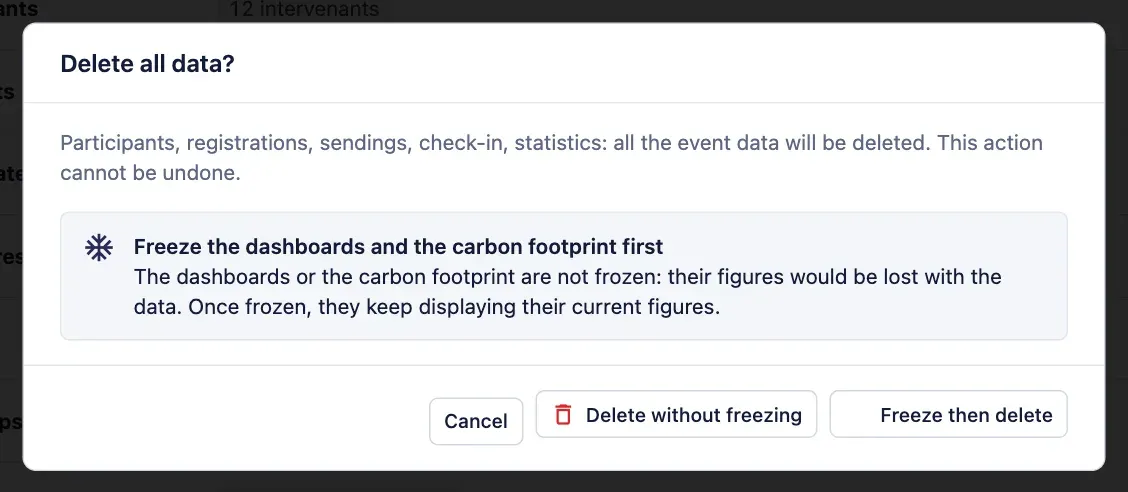
All rows are cleared except for Orders: to delete orders, use the trash can icon on their row.
Obtain a deletion report
Section titled “Obtain a deletion report”To justify the deletion to your client or your data protection officer, request a deletion report from your project manager or AppCraft support. This document is prepared by AppCraft.
Frequently Asked Questions
Section titled “Frequently Asked Questions”Are the frozen dashboards still visible after the data is deleted?
Section titled “Are the frozen dashboards still visible after the data is deleted?”Yes. The Smart Hub and the carbon footprint report show the figures as of the date the data was frozen, with a banner reminding users of this.
Can I delete data from a single collection?
Section titled “Can I delete data from a single collection?”Yes: use the trash can icon in the row of that collection—for example, Exhibitors. The other collections remain intact.
See also
Section titled “See also”Was this page helpful?
Thanks for your feedback!
Can’t find your answer? Contact support
© AppCraft EventsAppCraft Events websiteLog inContact support