
InteractionArticle 10 of 17
The different gamification badges
Each badge is unlocked by one or more triggers: an action taken by the participant on the platform or on-site. This article lists the available triggers and what needs to be specified for each one.
Before You Begin
Section titled “Before You Begin”Conditions are chosen in the Unlock column of a badge’s window using Add a Condition. See “Creating Gamification Badges.”
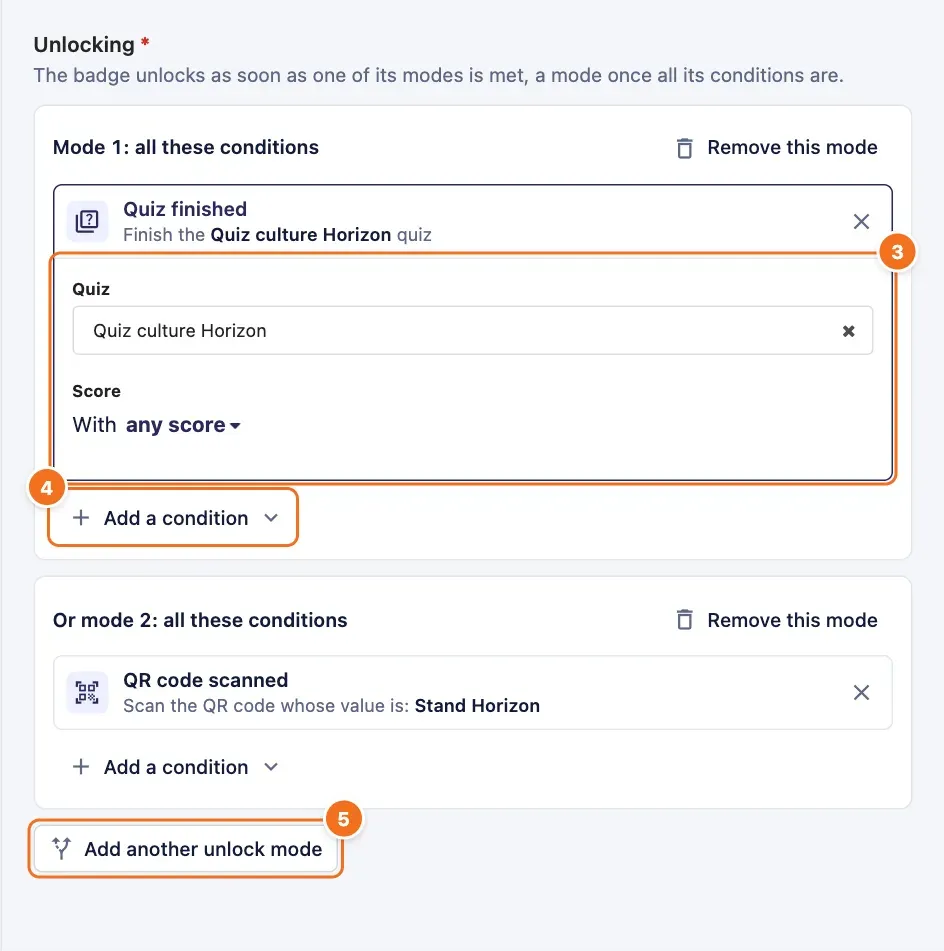
- Choose the condition from the list, organized by category (see categories below).
- Specify the relevant element (in this case, the quiz).
- Complete the settings specific to the condition (in this case, the Score).
The list shows only the conditions for modules that are enabled for your event. For example, Q&A conditions appear only if the Q&A module is enabled.
Simple action
Section titled “Simple action”| Triggers | The badge is unlocked when the participant… | To be specified |
|---|---|---|
| Click on button | clicks on a CTA button (CTA block) on the platform | the button |
| Viewing a file | opens a file from a file block | the file |
| Video viewed | watch a video about the platform | the video and the view percentage (10–90%) |
| Video view (exhibitor or workshop) | watch a video of an exhibitor profile or workshop | the card, or a number of different cards |
| Page viewed | visit a page | the page |
| Workshop live access | clicks to access a session’s live stream | the session |
User Profile
Section titled “User Profile”| Triggers | The badge is unlocked when the participant… | To be specified |
|---|---|---|
| User attribute updated | completing information in their profile (photo, company, etc.) | the relevant column |
Downloads
Section titled “Downloads”| Triggers | The badge is unlocked when the participant… | To be specified |
|---|---|---|
| Downloading a file | download a file from the platform | the file |
| Download a file (exhibitor or workshop) | download a file containing an exhibitor or workshop profile | the card, or a number of different cards |
Interactions
Section titled “Interactions”| Triggers | The badge is unlocked when the participant… | To be specified |
|---|---|---|
| Quiz finished | completing a quiz | the quiz and the score: any score, or a score greater than, equal to, or less than a specific point value. An alert is triggered when a score exceeds the quiz’s maximum |
| Social wall message published | posts or comments on the social wall | First post, First post with media, or First comment |
| Vote | vote for an exhibitor or a project | the voted-on item |
| Networking | interaction with other participants through networking | Send a message or chat with several people |
| Q&A - Ask a question | ask a question in a q&a | the Q&A |
| Q&A - Vote for a question | vote for a question in a Q&A session | the Q&A |
| Feddback | reply to a feedback survey | the questionnaire |
| Live feedback | reply to feedback from a session | feedback, or any other |
Check-in
Section titled “Check-in”| Triggers | The badge is unlocked when the participant… | To be specified |
|---|---|---|
| Check-in at a checkpoint | is scanned at a check-in checkpoint | the checkpoint, or any other |
| Workshop attendance | is scanned at the entrance to a workshop session | the workshop, or any other |
| QR code scanned | scans a QR code generated from the back office | the QR code |
| Triggers | The badge is unlocked when the participant… | To be specified |
|---|---|---|
| Agenda completed | registers for all the required sessions on their schedule | — |
| Appointment booking | schedule appointments with exhibitors | the exhibitor |
| Validation code | enters the correct code | Code and Mode: Match exactly this value or Ignore accents and lower/uppercase |
| Another unlocked achievement | has earned other badges | the required badges (ideal for a final badge) |
See also
Section titled “See also”Was this page helpful?
Thanks for your feedback!
Can’t find your answer? Contact support
© AppCraft EventsAppCraft Events websiteLog inContact support