
Accommodation and travelArticle 1 of 11
Understanding the Rooming Module
The Rooming module allows your participants to choose their hotel, room type, and roommates via the Registration Form or the app. You track the requests and export the rooming lists to the hotels.
Before You Begin
Section titled “Before You Begin”The module must be enabled for your event. It appears in the menu, under the CRM / Registration section, listed under the name of your accommodation collection (usually Rooming). If you don’t see it, contact your project manager.
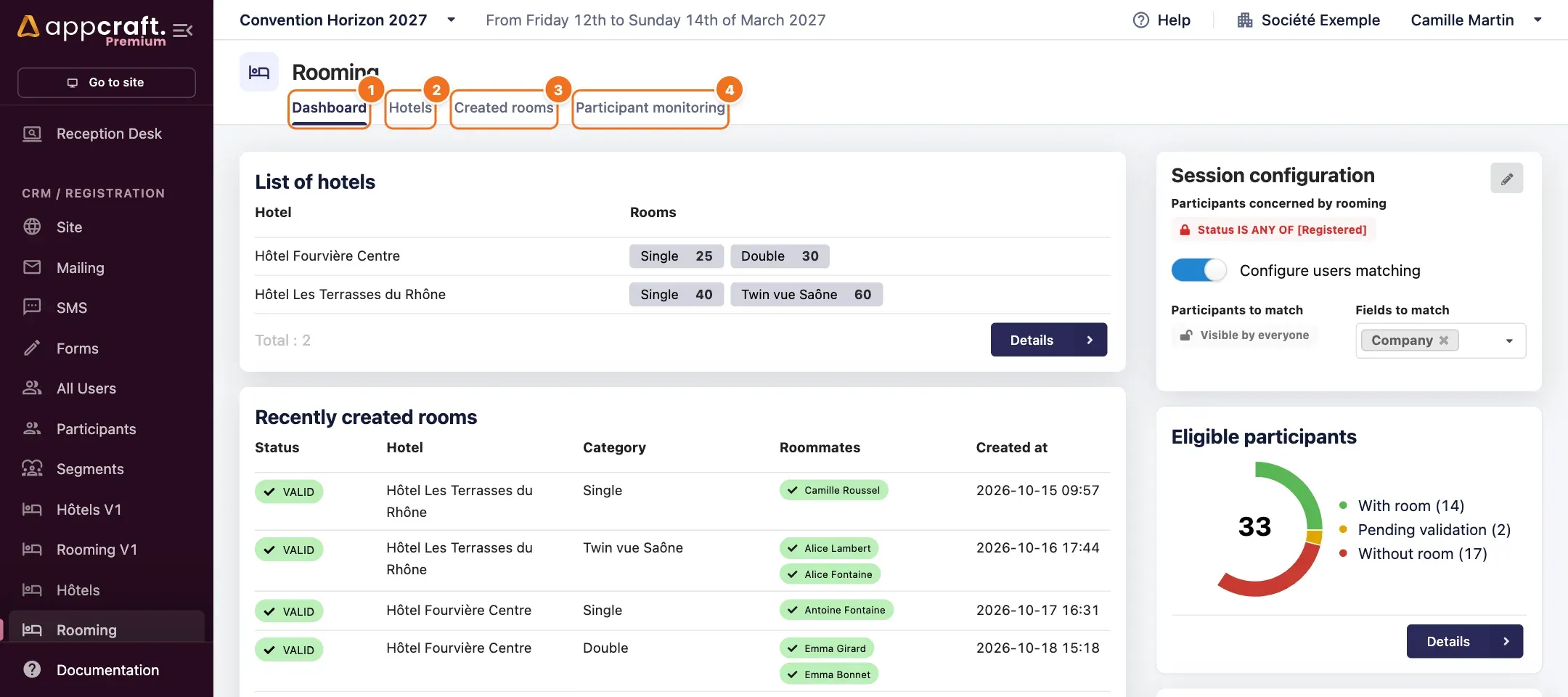
The module has four tabs:
- Dashboard: Overview, Types of Rooms, and Access Rules (Rooming Sessions).
- Hotels: the list of hotels, their room categories, and room quotas.
- Created rooms: all requested or assigned rooms, their status, and export files.
- Participant monitoring: each participant’s status (with room, pending, without room).
Setting Up Rooming
Section titled “Setting Up Rooming”Follow this order; each step depends on the next one:
- Create your room types (Single, Twin, Triple, etc.) in the Dashboard. See Setting Up Room Types and Rooming Sessions.
- Add your hotels and their room quotas in the Hotels tab. See Adding Hotels and Their Room Quotas.
- Set up the rooming session: who has access to rooming, which rooms are available, and with whom each participant can share a room (matching).
- Add the Rooming field to your registration form. See “Add Room Selection to the Form.”
- Track requests in Created rooms and Participant monitoring.
What the participant can do
Section titled “What the participant can do”- Choose a hotel, if you’re offering multiple options.
- Choose a room type from among those to which they are entitled.
- Invite one or more people to share your room. There is no limit on the number of users per room (Single, Twin, Double, Triple, or more).
Matching limits the list of potential roommates to people who share the same values in the fields you choose (same organization, same title, etc.).
See also
Section titled “See also”Was this page helpful?
Thanks for your feedback!
Can’t find your answer? Contact support
© AppCraft EventsAppCraft Events websiteLog inContact support