
Check-inArticle 5 of 5
Frequently Asked Questions About the AppCraft Check-in App
The AppCraft Check-in app is used to scan participants as they enter the event or sessions. Access entries are created in the back office, under the Check-in menu in the Attendance section. The full process is described in Organizing Attendance with Check-in.
Download the app: onelink.to/appcraft-checkin.
How do I create an access entry in the app?
Section titled “How do I create an access entry in the app?”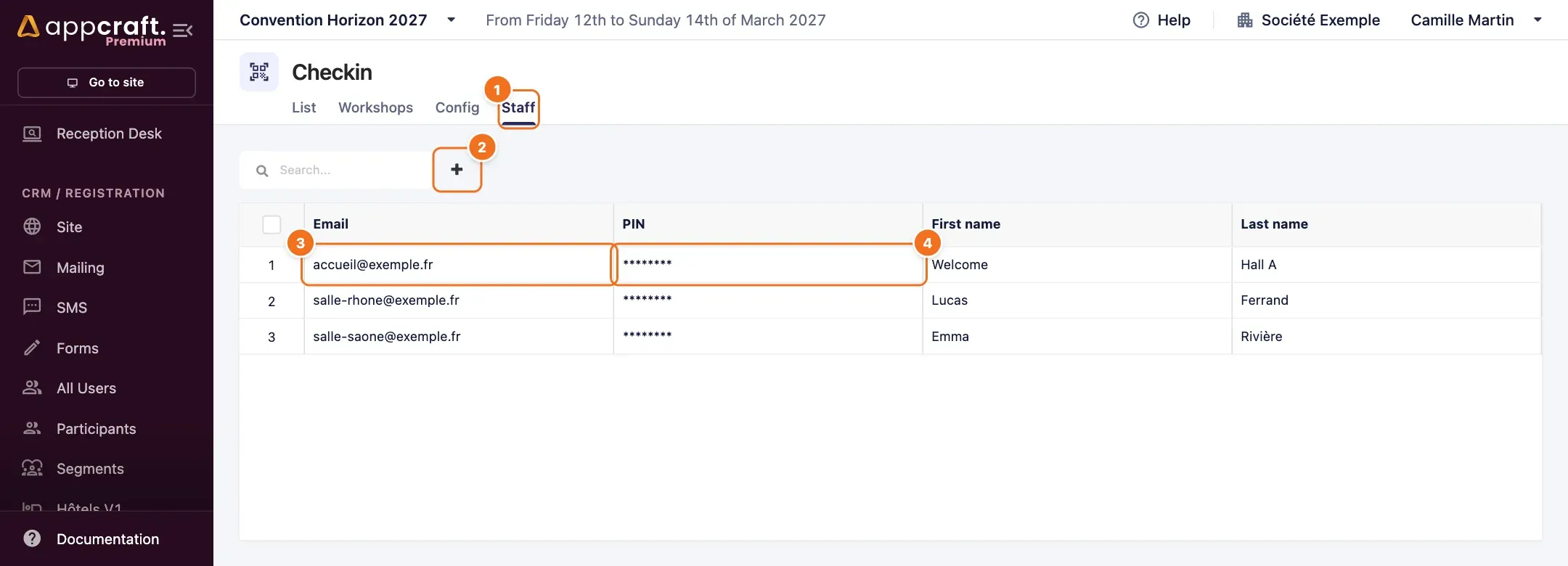
- Open Check-in, then the Staff tab.
- Add a row to the table.
- Enter the person’s email address.
- Set their PIN.
In the app, users log in with this email address and PIN.
Who can use the app?
Section titled “Who can use the app?”Anyone who knows an email address and a PIN from the Staff tab. Multiple users can use the same access at the same time: all check-ins are then grouped under a single account.
How can I see who hasn’t been scanned yet for a session?
Section titled “How can I see who hasn’t been scanned yet for a session?”In the app, there are two markers:
- the color to the left of the participant: green for present (check-in), blue for departed (check-out), white if neither has occurred;
- the Present, Left, and None tabs, provided the filter bar is enabled in the Config tab.
In the back office, the session details page also has a Missing Participants tab.
How do I show in the database the people who have been scanned at least once?
Section titled “How do I show in the database the people who have been scanned at least once?”Add the system column Checked by checkin (technical key checkin.checked) to the participant database via More actions > Update columns. You can then filter by this column.
The Scanned at Check-in system segment also groups these people together, making them ready to be targeted in a mailing: see “Create and Use Segments.”
See also
Section titled “See also”Was this page helpful?
Thanks for your feedback!
Can’t find your answer? Contact support
© AppCraft EventsAppCraft Events websiteLog inContact support