
Getting startedArticle 6 of 7
Create event from a template
A template is a pre-designed event template tailored for your organization. It allows you to start a new event with a pre-configured setup, without having to start from scratch.
Before you begin
Section titled “Before you begin”- The Templates menu appears only if your account has permission to view templates.
- To create the event, your account must have permission to create events.
Prepare the template
Section titled “Prepare the template”When you open a template, the left-hand menu turns blue. This lets you know that you’re editing the template, not an event.
Set up all the information in the template that you want to carry over from one event to the other, for example:
- the website;
- Mailing templates;
- Registration Forms;
- badges;
- the feddback.
Create the event from the list of templates
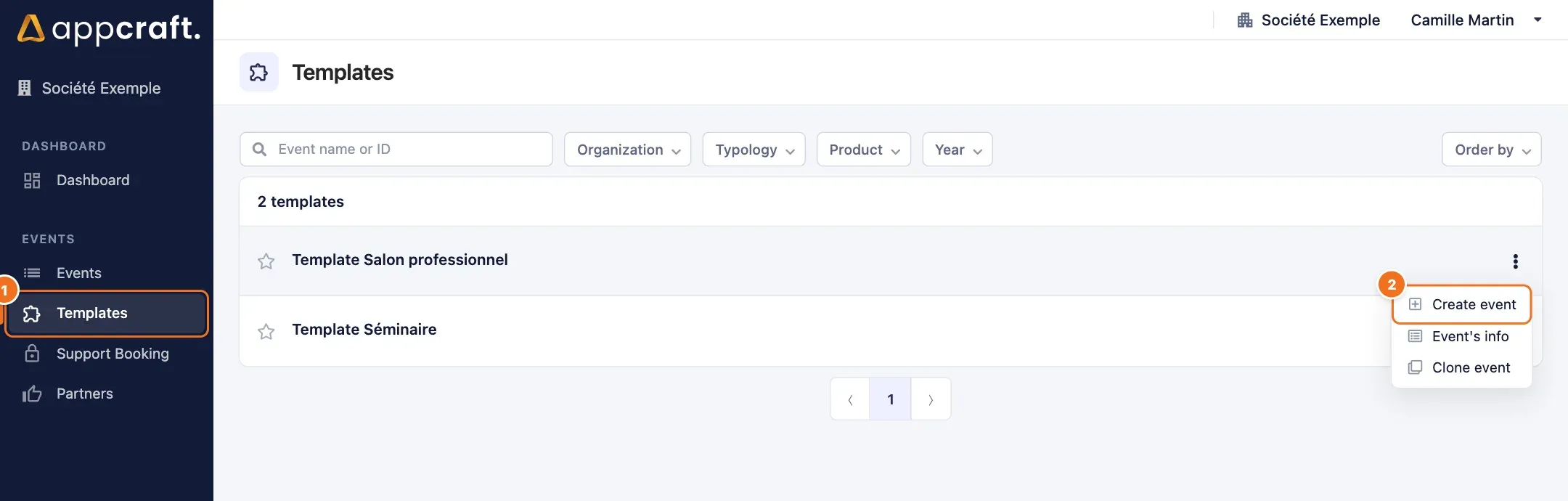
Section titled “Create the event from the list of templates”- From your organization’s dashboard, click Templates in the left-hand menu.
- On the template row, open the menu … and then click Create event.
- Fill in the event details: Event’s name, Event url, dates, description, etc.
- Click Create my event. It takes just a few seconds to create.
Create the event from the list of events
Section titled “Create the event from the list of events”- In Events, click Create event.
- Search for the template, then click Choose.
- Fill in the event details and click Create my event.
The back office then creates the new event.
Frequently Asked Questions
Section titled “Frequently Asked Questions”Are the participants from the template copied over?
Section titled “Are the participants from the template copied over?”No. Creating an event from a template copies the setup (website, emails, forms, etc.), but not the registered users.
I don’t see the Templates menu
Section titled “I don’t see the Templates menu”Your account does not have permission to view templates, or your organization does not have any. Contact your organization’s administrator or your project manager.
See also
Section titled “See also”Was this page helpful?
Thanks for your feedback!
Can’t find your answer? Contact support
© AppCraft EventsAppCraft Events websiteLog inContact support