
Platform and web appArticle 19 of 22
Manage the platform menu tabs
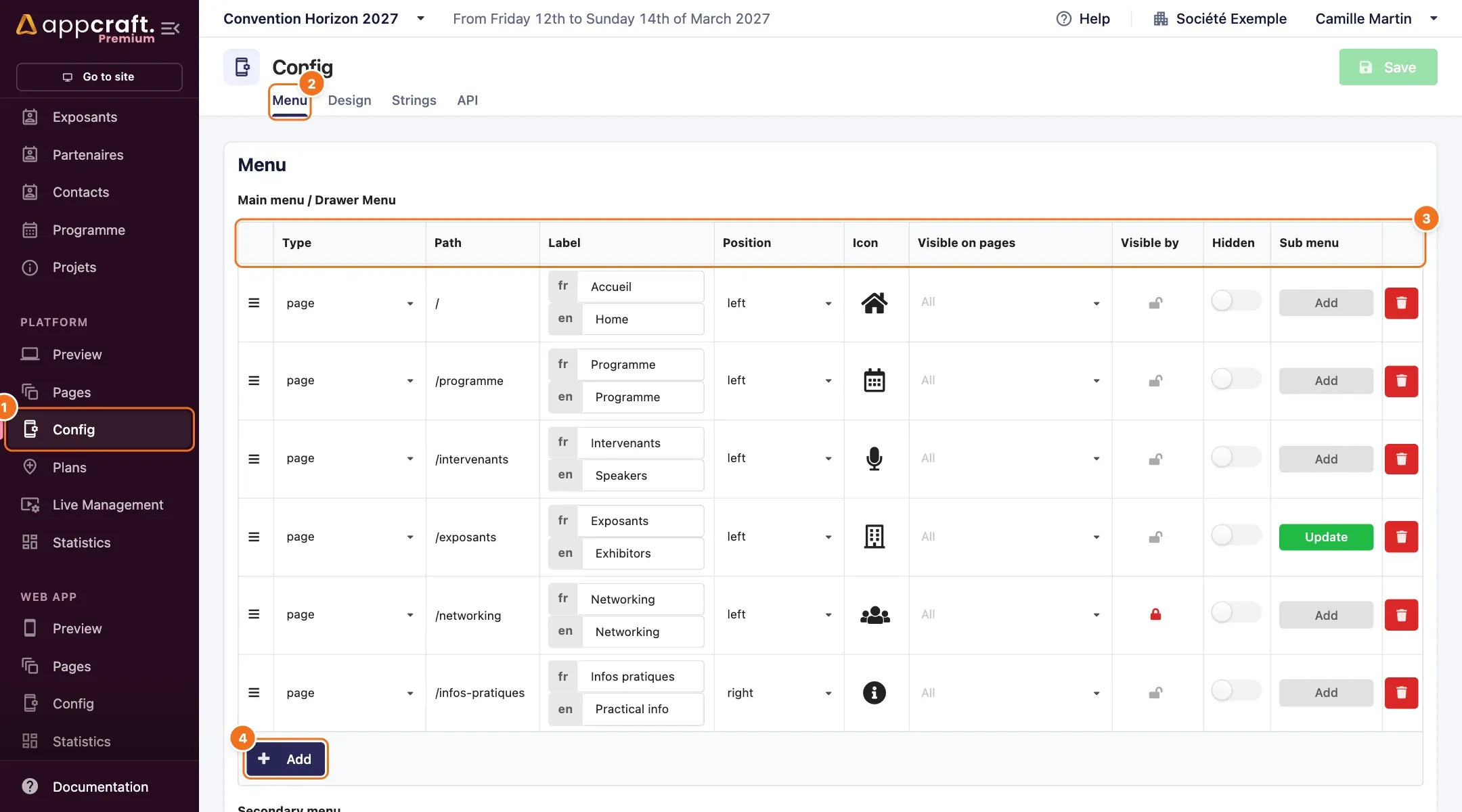
The platform or Web App menu is configured in an array: one row per tab. You can add, hide, or rename tabs there.
Where is the menu located?
Section titled “Where is the menu located?”- In Platform (or Web App), click Config.
- Stay on the Menu tab.
The Main menu / Drawer Menu table lists the tabs. Below that, you’ll find the Secondary menu and the Bottom tabs.
How do I add a tab?
Section titled “How do I add a tab?”- Below the table, click Add.
- Choose the Type (for example,
page) and the target page. - Enter the Label shown to participants, then the Icon.
- Click Save.
How do I hide or show a tab?
Section titled “How do I hide or show a tab?”Check the Hide checkbox in the tab’s row to hide it. Uncheck it to show it. Then click Save.
How do I rename a tab?
Section titled “How do I rename a tab?”Edit the text in the Label column, then click Save. If the platform supports multiple languages, enter the label in each language.
See also
Section titled “See also”Was this page helpful?
Thanks for your feedback!
Can’t find your answer? Contact support
© AppCraft EventsAppCraft Events websiteLog inContact support