
InteractionArticle 12 of 17
Show the gamification ranking
The Gamification page shows participants their ranking in the ranking system in real time, as well as their badges. It completes the badges and points that you configure in the Gamification module.
Before You Begin
Section titled “Before You Begin”The Gamification module must be enabled for your event, and your badges must be created: see Create Gamification Badges and The Different Gamification Badges. Without the module, the Gamification page type will not appear: ask your project manager to enable it.
Create the page
Section titled “Create the page”- Open Web App > Pages (or Platform > Pages) and click Add.
- Choose the Gamification type. The path
/gamificationis suggested. - Enter the Title and choose the Publication state.
- Click Save, then click the new page in the list.
Configure the ranking
Section titled “Configure the ranking”- On this page, stay on the Page content tab.
- Under Tabs, check the rankings you want to display and give them a Title:
- Global ranking: all participants;
- Team ranking: teams competing against each other;
- User ranking in his own team ;
- User ranking with his achievements: the user’s position and which badges have been unlocked or not.
- For team rankings, choose the field used to group users into teams. This field must be a single-select column in your participant database, such as “Region.”
- In Users, configure the list:
- List subtitle template: information shown below the name, for example
{company}for the company; - Max users to display: 100 by default;
- Users to hide: a condition for excluding accounts, such as your test accounts.
- List subtitle template: information shown below the name, for example
- In Design, check Show top 3 on podium and choose the theme:
light(light colors) ordark(dark colors). - Click Save.
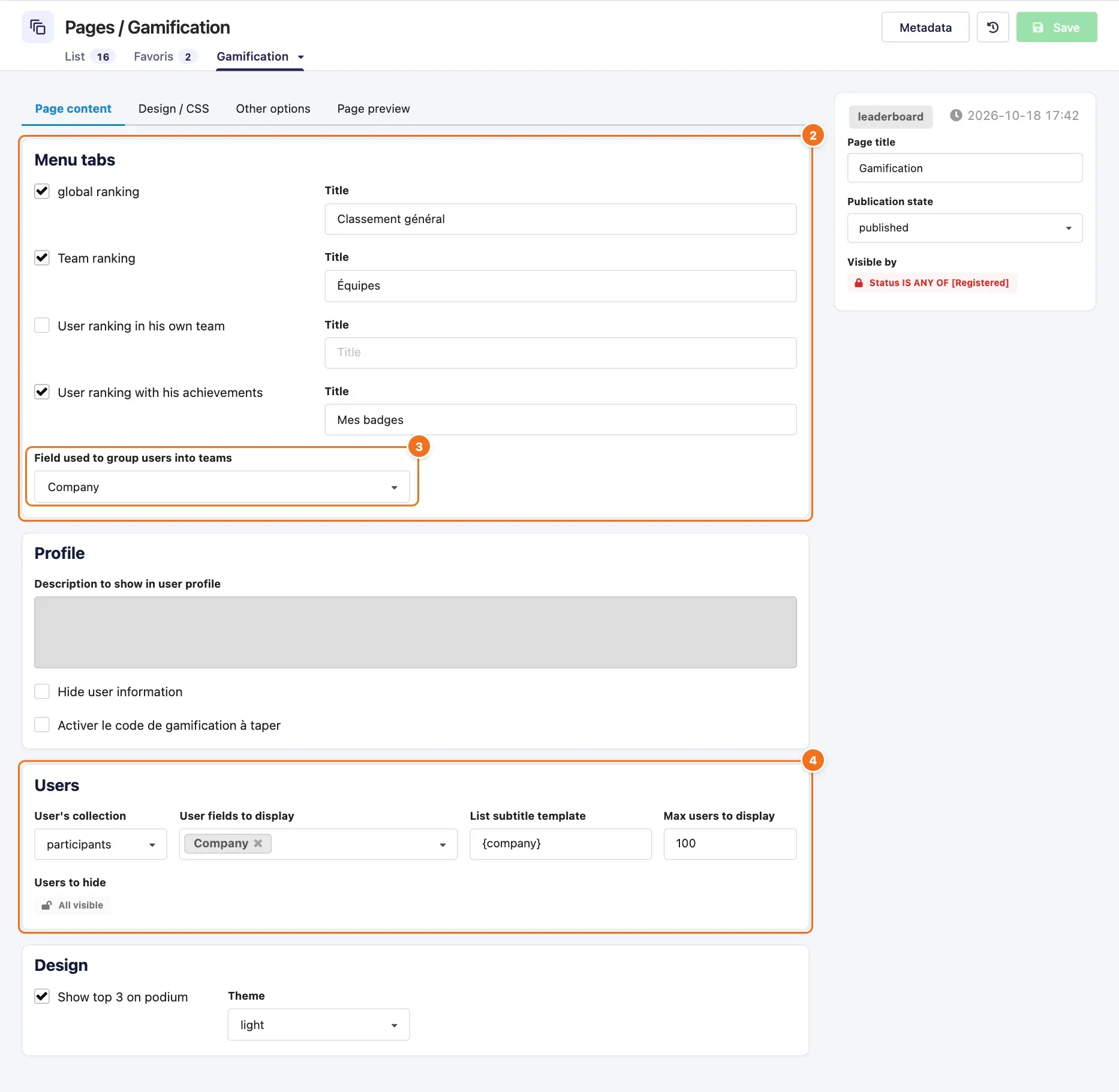

The Profile section also lets you add a Description to show in the user profile, Hide user information, and Enable the gamification code to be entered to unlock a badge with a code.
See also
Section titled “See also”- Create and configure a page on the platform
- Build a CMS Page using blocks (Achievements and Validation code blocks)
- Create gamification badges
- The different gamification badges
- Track gamification statistics
Was this page helpful?
Thanks for your feedback!
Can’t find your answer? Contact support
© AppCraft EventsAppCraft Events websiteLog inContact support