
Platform and web appArticle 14 of 22
Edit the platform's texts
The Texts tab lists all the platform’s fixed texts (buttons, messages, titles) and allows you to replace them with your own, in each language.
Before you begin
Section titled “Before you begin”The Texts tab is available only in Platform > Settings. It is not available in the Web App.
Edit a text
Section titled “Edit a text”- In the Platform menu, click Config, then click the Texts tab.
- In the Search… field, type a word from the text you want to edit or its key.
- In the column for the desired language (fr, en…), enter your text. The original text remains displayed in gray as long as the field is empty.
- Click Save in the top right.
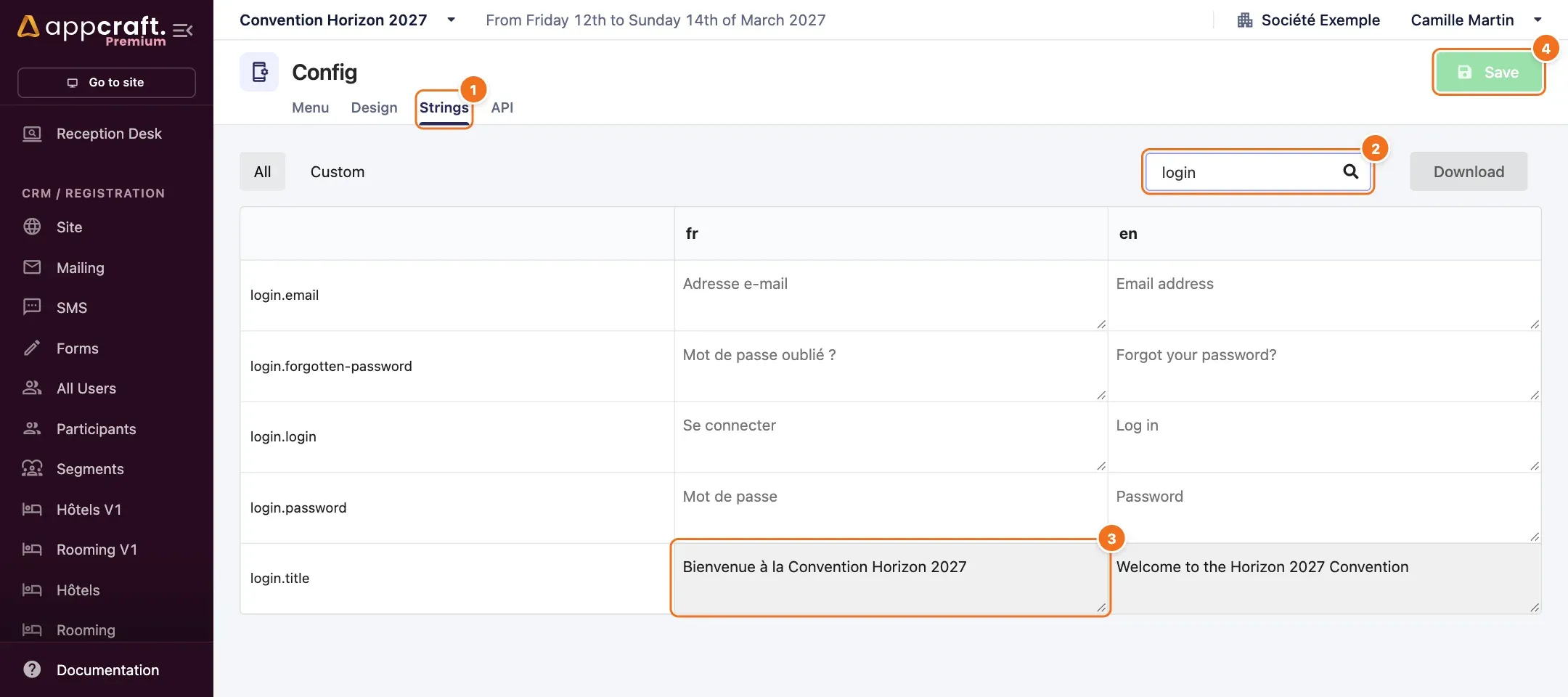
- All shows all platform texts.
- The Custom tab shows only the texts you have already edited.
- Download exports the displayed list to an Excel file, which is handy for proofreading or translation.
See also
Section titled “See also”Was this page helpful?
Thanks for your feedback!
Can’t find your answer? Contact support
© AppCraft EventsAppCraft Events websiteLog inContact support